



- Sku:
- Vendor: Moza Racing
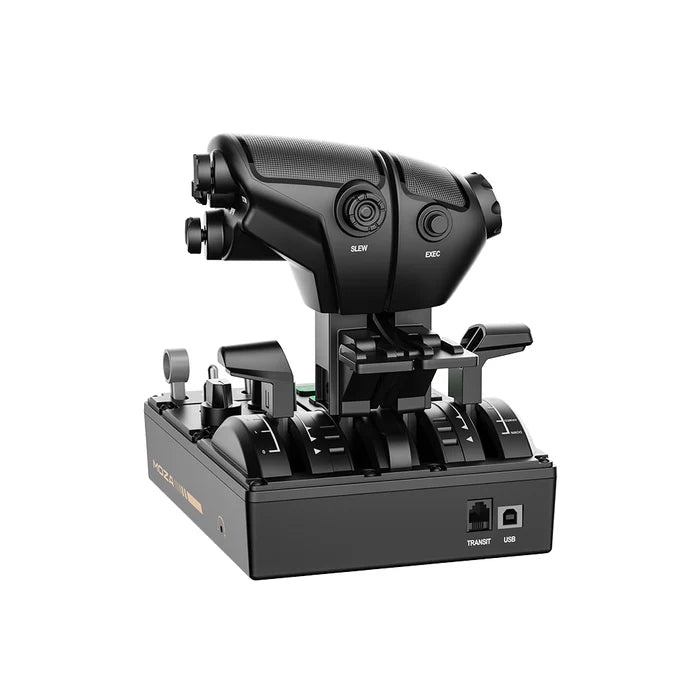
MOZA MTQ Throttle Quadrant
Overview of MOZA MTQ Throttle Quadrant
-
Modular Throttle System:
The MTQ can be equipped with specialized throttle modules for different aircraft types: fighter, Airbus (TQA), and Boeing (TQB). Each module offers characteristic detents and throttle force feedback for each aircraft type, allowing you to feel the tactile sensation when engaging positions such as CL, FLEX, TOGA, reverse thrust, etc. -
Quad-axis Independent Control:
The device has 4 separate control axes for functions like throttle, speedbrake, flaps, etc., along with physical detents to stop movement at specific positions. -
Feature-rich Control Panel:
The MTQ is equipped with 23 physical control buttons including:-
10 multi-function buttons
-
3 rotary knobs
-
3 toggle switches
-
1 landing gear lever
-
6 customizable RGB buttons (16.7 million colors) to help you easily identify functions in the cockpit.
-
-
Integrated into MOZA Ecosystem:
The device connects directly to MOZA flight bases via an RJ11 cable, saving USB ports and allowing easy adjustment in the MOZA Cockpit software — including detent logic configuration, RGB lighting, telemetry feedback, etc. -
Wide Compatibility:
The MTQ works with popular simulation software such as Microsoft Flight Simulator (MSFS), X-Plane, and DCS World when connected to a PC.
Other Highlights
-
Customizable Throttle Feel: Throttle damping (resistance adjustment) on each axis allows you to choose between a smooth or heavier control feel.
-
Easily Replaceable Modules: You can swap out the TQF (fighter), TQA (Airbus), or TQB (Boeing) throttle modules depending on the simulated aircraft type.
-
Suitable for Cockpit Setups: The MTQ is a complete throttle unit suitable for mounting on a simulation desk or a professional 3D cockpit setup.
In summary: The MOZA MTQ Throttle Quadrant is a multi-functional flight simulation throttle that can be customized for various aircraft types, helping you elevate your flight simulation experience to a more realistic and professional level with numerous buttons, switches, travel, and authentic feel.
Add an additional description to your products. You may set the same content for all products.
Ex: Shipping and return policies, size guides, and other common questions.
Or you may link a dynamic source to show product fields like vendor or custom product meta fields.
Ex: Ingredients, nutritional info, additional features and other unique per-product data.
Have a question?


MOZA MTQ Throttle Quadrant
TIÊU ĐỀ PHỤ
Văn bản có nền màu và hình ảnh bên
This section allows you to set a text box background.